


Access to Forms can be viewed and restricted from Roles, thereby giving the merchant control over who can view, edit and delete forms.
This article covers the following topics;
For a list of terms used in the Wellyx application & across the support website, please consult our Glossary.
Applicable Modules
In your Core account, navigate to Setup > Role.
Access for Forms is modular-based, with the following modules to consider;
- Setup
- Staff
- Client
- Lead
- Member
- POS
Each module contains Forms View & Forms Save and these roles grant access to which users can view or perform actions in any module in regards to forms.
Applicable Roles
There are two roles applicable to Forms. These being
- Forms View: This role allows the user to view the forms but not add, edit or delete the forms in that particular module.
- Forms Save: This role allows the user to view, add, edit and delete forms in that particular module.
Using Form Roles
Module roles can be configured independently depending on the user. If a merchant wanted to grant access to a user to view forms in setup but not be able to make any changes, he would enable the Forms View button and disable the Form Save button as below.
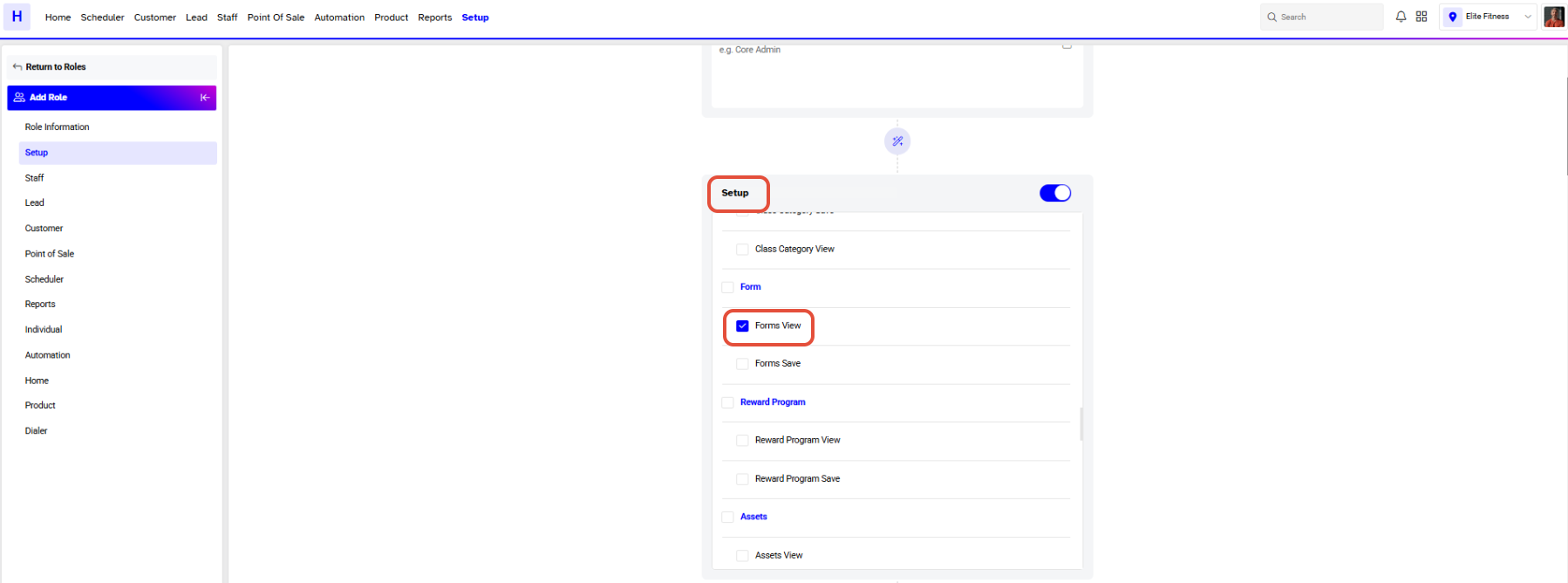
This would result in the user being able to view forms in Setup but not being able to add, edit or delete forms as below;




